Jerz > Writing > Academic
[ Argument | Title | Thesis | Blueprint | Pro/Con | Quoting | MLA Format ]
(View a Google Doc template for an MLA Style paper.)
0.1) If you’ve been asked to submit a paper in MLA style, your instructor is asking you to format the page and present the content in a specific way. Just as football referees dress a certain way, and Japanese chefs cook a certain way, writers in certain disciplines follow a certain set of conventions. This document will show you how to format an essay in MLA style.
0.2) If, instead of questions about putting the final formatting touches on your essay, you have questions about what to write, see instead my handouts on writing a short research paper, coming up with a good thesis statement, and using quotations in the body of your paper.

- Document Settings
(1 inch margins; double spaced; 12-point) - Page Header
(name and page number, upper right of every page) - Title Block
(assignment info and an informative title) - Citations
(no comma between the author and page number; commas and periods go outside of inline quotes) - Works Cited List
(lots of tricky details! sort alphabetically by author, not by the order the quotes appear in your paper)
For the most complete information, check your campus library or writing center for the MLA Handbook for Writers of Research Papers, 8th ed.

MLA Style Format (First Page)

How to format the Works Cited page of an MLA style paper.
See Also


1. Document Settings
Your word processor comes with default settings (margin, line height, paragraph spacing, and typeface) that will likely need adjustment. For MLA style, you need:
 |
|
| (Jump directly to instructions for adjusting MS-Word settings in Windows or Mac; or, skip ahead to 2) Page Header.) | |
1.1 Adjusting Document Settings in MS-Word (Windows)
My copy of Microsoft Word for Windows defaults to
- 1-inch margins all around
- 1.15 line height
- 10pt spacing between paragraphs
- Calibri 11-point typeface.
Changing to MLA Style (Windows)
- The default margins in my test run were fine, but if you need to change them:
Page Layout -> Margins -> Normal (1-inch all around) - The default line height is too low. Change it to 2.0.
Home -> Line Spacing -> 2.0.
(You could try fudging it to 1.9 or 2.1 to meet a page count, but any more than that and your instructor may notice.) - The MS-Word default adds extra space after paragraphs.(MLA Style instead requires you to signal paragraph breaks by indenting the first line.)
CTRL-A (select all your text)
Home -> Line Spacing -> Remove Space After Paragraph - Change the typeface to Times New Roman 12-point.
Home-> Font Face Selector (change to Times New Roman)
Home -> Font Size Selector (change to 12)
1.2 Adjusting Document Settings in MS-Word (Mac)
My copy of Microsoft Word for Mac defaults to
- 1.25 inch left and right margins, 1 inch top and bottom
- 1.0 line height
- no extra spacing after paragraphs
- Cambria 12-point typeface
Changing to MLA style (Mac)
- In my test run, the left and right margins are too big. To change them:
Layout -> Margins -> Normal (1-inch all around) - The default line height is too low. Change it to 2.0.
Home -> Line Spacing -> 2.0 - My Mac copy of MS-Word does not add extra spaces after paragraphs. If yours does:
Home -> Line Spacing -> Line Spacing Options… (a new window will pop up)
Don’t add space between paragraphs of the same style (check this box) -> OK - The 12-point Cambria will probably be fine, but to change the typeface:
Home -> Font Face Selector (change to Times New Roman)
Home -> Font Size Selector (change to 12)
2. Page Header
In the top right of every page, use your word processor’s “Page Header” function add an automatic page number and your surname.
2.1 Adding the Page Header in MS-Word (Windows)
- Insert -> Page Number -> Top of Page -> (choose the right-justified “Plain Number” option)
- The cursor will jump automatically to the right place for you to type your surname.
- Click anywhere in the body of the paper to exit the header area.
2.2 Adding the Page Header in MS-Word (Mac)
- Insert (in the top menu) -> Page Numbers… -> (Set “Position” to “Top of Page (header)” and “Alignment” to “Right”)
- Click just to the left of the new page number, and type your surname.
- On my test document, my name was too far over to the left; grab the triangular tab adjuster just above your name, and drag it a notch to the right.
3. Title Block
In the upper left corner, type your name, your instructor’s name, the course number and section, and today’s date. Centered on the next line, type an informative title that actually informs the reader of your main point (not just “English Paper” or “A Comparison between Hamlet and Macbeth”).

- Like all the other text in an MLA style paper, the title block is double-spaced.
- The title is in the same font as the rest of the paper — it is not boldface, or enlarged.
- There is no extra space above or below the title.
- A truly informative title will include the general topic, and your precise opinion on that topic. (So, if you pan to compare Hamlet and Macbeth, your title should state the unique point you want to make about Hamlet and Macbeth. Reuse part of your thesis statement.)
4. Citations
This handout presumes you already know why you should cite your sources (to establish your authority, to introduce persuasive evidence, to avoid plagiarism, etc.).
To fully cite a source requires two stages. The first happens in the body of your paper (the “in-text citation”) and the second happens on a separate page at the end of your paper (see “Works Cited List,” below.)
4.1 Citing a Block Quote (more than three lines)

- Long quotes can start to look like filler. Only use a block quote if you have a very good reason to include the whole passage. (You can usually make your point with a shorter quote.)
- If you do have a good reason to quote a passage that is several lines long:
- Select the text and click the “Increase Indent” icon (see image, right).


- Place the parenthetical citation (the author’s name and the page number) after the period. (This is different from inline quotes, below.)
- There is no comma between the author’s name and the page number.
- If the quotation runs across more than one page: (Wordsworth-Fuller 20-21) or (Wordsworth-Fuller 420-21).
- Select the text and click the “Increase Indent” icon (see image, right).
- Skip wordy introductions such as, “In his informative guide The Amazing Writing Book, published by Elizabeth Mount College in 2010, the noted composition expert Maxwell Wordsworth-Fuller describes the importance of citations in MLA style papers.” Cutting the filler leaves more room to develop your own original ideas. (See “Integrating Quotations.”)
4.2 Citing an Inline Quotation
When the passage you want to quote is less than three lines long, use inline style. Here we have two brief passages, taken from the same page of the same source, so we can handle both with a single parenthetical citation.

- The parenthetical citation appears outside the quoted material.
- The period that ends the sentence comes after the close parenthesis. (This is different from block quotes, above.)
- In this example, we have changed the first word a little, lowercasing it in order to fit it into our own sentence. To let the reader know what we changed, we put [] around it.
- Again, note the absence of a full sentence that explains who Wordsworth-Fuller is and where the quote comes from. All that info will be in the Works Cited list, so we leave it out of the body of the paper.
4.3 Citing a Paraphrase
Let’s imagine we want to reference Wordsworth-Fuller’s general idea about citation as a way to establish credibility, but we don’t need to include any of the technical details. We can save space, and make it much easier on our reader, if we paraphrase:

- Use paraphrasing for variety, or to make a passing reference without taking up much space.
- If we use an author’s idea, rephrased in our own words, we must still cite the idea.
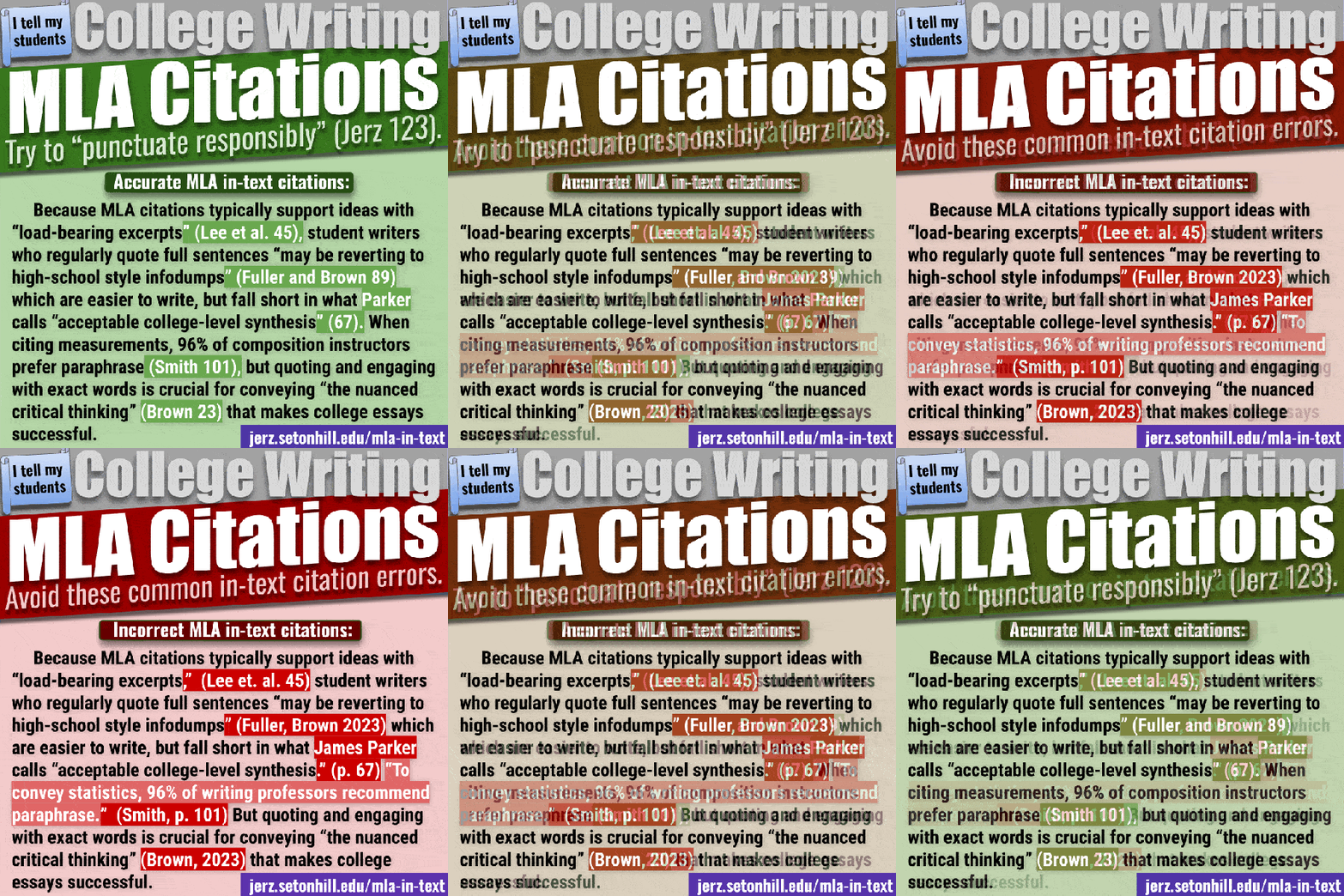
Tips for avoiding common errors in MLA citations.
5. Works Cited List
A research paper isn’t a research paper unless you end with full bibliographical details on every source you cited. This part can be tedious and tricky; leave yourself plenty of time to do it.

How to format the “Works Cited” list of an MLA style paper.

- Start a new page.
- MS-Word Wind: Insert -> Page Break -> New Page.
- MS-Word Mac: Document Elements -> Break -> Page.
- Title your new page: Works Cited
MLA style calls for no extra spaces above or below the page title; no special formatting.
5.1. How to Create an Individual Works Cited Entry
Exactly what goes into each item in your bibliography depends on what kind of item it is. The general format is as follows:
Author. Title of Source. Container, contributors, version, volume and issue, publisher, date, location.
Exactly how that basic format gets turned into a Works Cited entry depends on the source.
Here’s the basic format for any book:

- Note that the author’s last name goes first.
- If the book had two authors, only reverse the names of the first author.
- Gibaldi, Joseph, and George Spelvin.
- If the book has three, authors:
- Gibaldi, Joseph, Alan Smithee, and George Spelvin.
- More than three authors?
- GIbaldi, Joseph et al.
- The italicized phrase “et al.” is an abbreviation for the Latin “et alia,” meaning “and others.”
- The “al.” is short for a longer word, so we mark the abbreviation with a period.
- The “et” is not an abbreviation, so it doesn’t get a period.
- If the book had two authors, only reverse the names of the first author.
- Place periods after the author’s name, after the title of the book, and at the end of the entry.
- The title of the book is italicized.
- The publisher is the name of the organization responsible for publishing the book. In this example it’s the Modern Language Association. It might instead be Project Gutenberg, the US Department of Agriculture, or the World Health Organization,
Basic Format for Any Academic Article
Author. “Title of Article in Quotation Marks.” Title of Journal in Italics, volume #, issue #, YEAR, pp. [pages of article]. Italicized Name of Database.

Let’s break that example down.
The author Margaret Kantz wrote the article “Helping Students Use Textual Sources Persuasively.” That article doesn’t exist on its own floating in space; it was published by a journal called College English, in the 52nd year of publication, in the first issue of its 52nd volume, in the year 1990, the article started on page 74 and ran through page 91. The student found this article while searching the database Academic Search Elite.
Every academic article has a specific title, and is published in a journal with a different title. (Online citation generators often get this wrong, and will often repeat the same title twice.)
What is this “volume 52, number 1”?
If College English were a TV series, then “volume” would be which season, and “number” would be the episode number. The title of the article would be the equivalent of a scene within that episode.
The title of the database, Academic Search Elite, is like the title of the streaming service you’d need to sign into.
If you were talking about your favorite TV show and you told me it was on Netflix, or Disney+, I could find it. But if you told me “It’s on my MacBook” or “It’s on my Samsung phone,” that wouldn’t help me to find it.
 | EBSCOhost is not specific enough. It’s not the name of a database; it’s a tool researchers use to access databases, but different schools can access different databases through different EBSCOhost subscription plans |
| If you tell me that I can find your favorite TV show “on a MacBook,” that’s too vague. Just because I own a MacBook doesn’t automatically grant me access to all the streaming services you access on your MacBook. In a similar way, telling me you found a source on “EBSCOhost” is too vague. | |
| “Academic Search Elite” or “SPORTDiscus with Full Text” are titles of specific databases. |
| This is like telling me your favorite TV show is on Netflix or Disney+. It tells me the specific name of the database I need to access in order to find the article you found. | |
Basic Format for Any Web Page

In the above example, reporter Camila Domonoske filed a news story called “Students Have ‘Dismaying’ Inability To Tell Fake News From Real, Study Finds,” that aired on a news program called The Two-Way, which is published by National Public Radio, and the story aired Nov 23, 2016.
In MLS Style, the full URL is optional. Really long URLs with long strings of numbers in them are often generated for specific users, so someone else who visits that same URL will often get an error message.
You might shorten the URL to “npr.org,” because it would be a simple matter to use a search engine to find the actual story.
Other Citation Examples
What if your source doesn’t fit any of my examples?
You might be trying to cite something that doesn’t fit the above pattern, like a social media post, a video game, a work of art, an email from a relative, a billboard, or something else. It’s just not practical for me to try to include an example of every single thing it’s possible to cite.
The MLA citation format is designed to be flexible, so that it works for forms of media that haven’t been invented yet.
See Purdue OWL’s handouts for how to create a bibliography entry for a book, an article in a periodical (such as a journal or newspaper), or an electronic source (such as an email, web page or a YouTube clip). See also this list of other common sources (such as a personal interview or a movie).
5.2. How to Organize Your Works Cited list
Sort the entries alphabetically by the author‘s last name.
- If the author is an organization (such as a government agency or non-profit foundation), alphabetize according to the name of the organization.
- If you are citing a painting, or a composer, then obviously “author” has to be interpreted a little loosely.
- Unless your instructor ask you to organize your Works Cited list differently, everything should be alphabetized together, in a single list. MLA does not require that you separate works of different kinds, or that you cite works in the order that they appeared in your paper, or that you write annotations to go along with each item.
- Use double-spaced line height. (in my copy of Word, I select the text and choose Format -> Paragraph -> Line spacing -> Double -> OK.)
- Use hanging indent paragraph format. (In my copy of word, I select the text then choose Format -> Paragraph -> Indentation -> Special -> Hanging Indent.)
29 May 2011 — new document posted, replacing outdated handout written in 1999.
06 Jun 2011 — expanded section on organizing the Works Cited list, since several readers asked for clarification.
07 Jun 2011 — reorganized for emphasis
19 Apr 2012 — added numbers to more subheads
24 Mar 2014 — added details on Works Cited paragraph formatting.
02 Oct 2016 — updated with MLA 8th Edition details.
30 Nov 2016 — added annotated Works Cited sample image.
07 Sep 2020 — updated section 5.1
Related Writing Links |
|
What is the parenthetical citation for a quote from NYTimes on the web?
The same as any source without physical page numbers — just use the author’s surname.
ok i have a paper on a math subject due on friday it on pi and i have no idea how 2 put it all together……. i feel really stupid saying that
what if i have 2articals that dont have an author, their title is the same and the qoute is on the same page?
Two different articles with the same title, with page numbers, but no author? My guess is that you haven’t found high quality sources, since the most credible authors will want to make sure their name is connected to their work. If you are talking about pamphlets or web pages, who is the publisher? Use the name of the organization publishing them where you would put the name of the author.
If neither source mentions an author or publisher, then I’d suggest not using either source in your paper. I’d say you should find more credible sources.
thanks,this was very helpful
This page helped me tremendously. Thank you so very much!
I have to write a paper for my final and I have a question. I alwasy thought that you were supposed to indent your paragraphs 1 inch at the start, apparently it is supposed to be only a .5 indent. I’m not sure which of the two it is. Any help? Thanks and nice article. :D
MLA style calls for a half inch paragraph indent, and a 1-inch margin all around.
Wow, this is really great and Professor Dennis takes the time to answer all students questions, even at 4:42 AM! Thank you Professor!
I’m not usually up at 4am, but since I was…
How do you start the header with name and page number AFTER the title page and outline? i.e. the body of the paper? Each time I try, it wants to number the title page and the table of contents! Been looking for formatting this etc. I am stuck! Thanks for all your help!
That answer depends on what word processor you are using. You might try searching for a user forum devoted to your software.
My professor wants us to use MLA format and asked for an abstract. I’m wondering how to insert it correctly?
MLA style does not require an abstract, so i am not sure what to suggest. It’s perfectly legitimate for your prof to ask for one. Just ask him or her for a model, or make an educated guess and bring it by for a quick check during office hours.
i find this very helpful!!!!!!!!!!!!
Wondering how to cite a statement from a website (no author noted on the website) taken from an original source – the original source is a popular book but I can’t get my hands on it right now so I thought I’d just cite the article on the website that referenced it. How do I cite a website without knowing the author?
You might be able to find the right page by searching in the book on Amazon or Google Books, but if you didn’t actually read it in the book yourself, you are right to avoid citing the book directly.
I wouldn’t use that anonymous source… how do you know the source got the quotation right?
But if you do choose to use that questionable, source, my “Bub Builder” resource tries to cover all the permutations, including what to do if there is no named author. http://jerz.setonhill.edu/writing/academic1/bibbuilder/
This helped me out, but i didn`t understand how to use the Work Cite thing. The rest was VERY helpful for my English project, so….thanks a lot man c:
Sorry you found part of it confusing, GothicChick. If you let me know exactly where you got lost, maybe I can fix the problem.
Thanks this was all very helpful information :)
Thank you for the sample and the details… It was very helpful for me.
thanks helped alot
I wish to request for the format for writing long essay
Hello, thanks for your comment. MLA Style is the same for short and long papers, so you have found the right page. Is your question about the purpose, method, strategy of writing?
I agree with Dennis, the one above me I mean, but i think he mean that he means you sound over protectING, if you dont want to see harsh things online dont go onlnie. there are worse things like child trafficcing, and you choose to yell at someone for just saying DUHHH everyone knows how to use words… PATHETIC should be you named not parent. GROW up stupid idot
Just as I didn’t see myself as being harsh, I don’t see “Parent” as yelling. Life is too short for me to spend it getting mad at dots on a screen.
Where’s the love?
If we are going to insult others, can we please do it with correct grammar and spelling? =)
Let me say the following sentence on behalf of everyone in this site: beard_nelson is a mentally retarded jerk.
I think that you need to write baout how to use a block quote, this whole thing ws useless and stupid, didn’t help me at all, as for PARENT shut up you just sound over protected and ignorant.
For the format of a block quote, see item #4, “Citing a Block Quote.” For more detail about how and why to use block quotes, see http://jerz.setonhill.edu/writing/academic1/quotations-integrating-them-in-mla-style-papers/
I feel the response to the question dated 4.10.12 was inappropriate. Don’t discourage a child with your words. The statement “I’m not sure how I can make it any clearer” was not needed. I understand you go very basic with yor steps but lets be nice.
Thanks for the feedback. I did not intend that to sound harsh. If someone asks me what I mean by this or that detail, then I can improve that area. If I was frustrated, it was because the question didn’t help me see where I could be clearer.
I have to do an essay and make it in MLA Format by Friday. I was wondering how you do it on word……
You’ve found the right page… I’m not sure how I can make it any clearer. Start with #1, above.
At the beginning of a new paragraph, I do the regular indent. But, if the paragraph begins with a quotation mark, do I need to make an adjustment to the indention to make the first letter of the word line up with the previous paragraphs?
No, these is no need to adjust the margin like that.
This is my new fav website its saving my life
My daughter’s teacher is requiring an MLA title page, but I cannot find 2 formats that are alike. I thought title pages were obsolete, anyway. Also, her teacher is requiring both a works cited page and a bibliography. I have never heard of requiring both and cannot find anything online to confirm this as a correct format. Is this new? Which would come first? Thanks!
I suggest that the best way to proceed would be for your daughter to ask her teacher for clarification.
It may be that your teacher didn’t explain it well and needs to try again, or maybe the teacher did explain it and your daughter wasn’t paying attention, or maybe your teacher explained perfectly well but your daughter was out of the room for some perfectly legitimate reason.
Current MLA style does not require a cover page, and the Works Cited is the standard requirement, though it is also possible that a teacher may want a list of works consulted (whether they did or didn’t actually get cited in the paper), and likewise as part of the drafting process I often ask my students to submit an annotated bibliography, but in such a case I give the students a separate handout explaining that part of the assignment.
Your daughter’s teacher may have a very good reason for wanting certain components that vary from the official MLA style, but I won’t be marking the assignment, so whatever I say won’t be of much help.
Just an update: I went with my daughter for a conference with the teacher. She says colleges are requiring both Works Cited and a formal Bibliography of all works reviewed – not annotated, just exactly like the Works Cited page, but all inclusive. It’s been a long time since I earned my English degree and a few years since I taught MLA formatting in a high school setting, but I’ve never heard of such a thing. The style always changes, so I’ll just give her that one. However, every web site reference says that cover pages are obsolete. I just told my daughter that the bottom line is to give the teacher what she wants to get the A, then you can do what the MLA guide suggests in the future. Thanks for your help – great site!
Thanks for the update.
This is a life saver! I’m just returning to college after graduating high school 13 years ago and MLA is how I did every paper back then. I needed a major refresher and this was perfect! Thank you!
i think u just saved me from getting a zero on the report im doing…thank you so much.
What if the entire book is rewritten by editors? How would the citation work for that?
Melly, that’s the kind of specific question that I’d suggest you bring to your local reference librarian, your school writing center, or your instructor. If you don’t have time to check before your due date, then it’s probably better to put in too much information rather than too little. If your assignment is a rough draft, and you don’t cite it 100% perfectly, your instructor will probably reward your attempt and give you the chance to get it right.
Download link please?
Do I need to put the date by a musical composition?
The paper I’m writing is actually talking about when musical works were written, so if I mention them in my thesis paragraph, or after I’ve talked about them the first time in the body of my paper, do I need to continue to put the date beside it?
Thanks
MLA Style never includes the date of a source in an inline citation. It uses the author’s name and the page number of the detail you are citing.
When inserting page numbers 1/2 inch from the top, how do you get the page number above the 1 inch margin line? I’m using OpenOffice and can’t find a way to do that. Thanks
In the “Help” menu, try searching for “header.”
My 9th grade English students fight making a Works Cited page… I will be adding this site to my list of useful resources, and making a printable version – giving you credit, of course. :)
Your students are very fortunate! I’m glad I can help.
My instructor wants a reference page of 3 sources. I can only find citations. Are references and citations the same thing?
If you have been assigned an MLA style paper, then yes. But your instructor may have a good reason for wanting something else. Check with him or her, just to be sure.
Thanks this sight is really helpful for last minute. Your works cited saved me.
I wonder how it would be started ..
it should be something like introduction ?
This is a really great resource. I teach high school, and it’s tough to find user-friendly MLA guides. I’ll definitely be sharing this with my students!
I was wondering if to indent between paragraphs you could just use the tab key? Someone mentioned something in my class about using a 5-space indentation instead and was wondering which was correct.Thanks, this web-site is a life saver!
Yes, the tab key is how to indent a paragraph on any mainstream word processor. Tapping the space key five times would be how you would do it on a typewriter.
I really don’t get this
If you could be a little more specific, perhaps I could help.
This is very helpful :)
This was a great help! thanks for making this! i bet a lot of students are using this! keep the good work up :)
I wanted to know how to cite a document into my essay, than go on to explain what that document means
Amy, this page will probably help you.
http://jerz.setonhill.edu/writing/academic1/quotations-integrating-them-in-mla-style-papers/
Thanks so much Dennis, this is a much more concise and organized reference guide than the O.W.L. website.
Thank you. My son is in high school and did not have a lot of exposure to MLA formatting in middle school but is expected to know it now. This was very helpful.
Please help.
a)Show referencing entry (Reference List) in MLA writing style.
How would you write the heading on the first page in MLA writing style. (Write your answer below this line
b)The sources in MLA is titled:
a) Works Cited
b) References
c) Bibliography
(Please highlight your answer with color yellow)
C)Write in-text citation of paragraph belown in MLA writing style.
“Starting as an undersized settlement in central Italy, Ancient Rome grew into a large city becoming the heart of one of the largest and most long-lasting empires in history. At this stature, the Roman Empire stretched from West Asia, Britain, Spain and Danube River in central Europe, to the edge of the Sahara desert in North Africa. It lasted for some 500 years in the West and thousand years more, in the Eastern.’’ (Quoted from “ROME, ANCIENT”, The New Book of Knowledge, 1998, Grolier Incorporated, p. 309).
This page covers formatting the whole paper. For formatting individual citations, try http://jerz.setonhill.edu/writing/academic1/bibbuilder/
Are there guidlines for roughly how long each paragraph should be? I seem to remember that my first college writing class gave a specific number of paragraphs per page (2-3?)
While individual instructors are free to provide such guidelines, MLA style does not specify the length of a paragraph. I would say the typical three-page paper should have four or five paragraphs, but that depends on the assignment.
Would have loved information on a title page. Not sure how far down or what all needs to be on it. Please help!
Sorry, MLA does not ask for a title page, so there are no guidelines to provide. If your instructor wants a title page, you will need to ask him or her for the details.
How can I remove a line that is verically across my manuscript between every paragraph in AbiWord?
I’ve never used that software, but perhaps you can find a user forum devoted to it.
Thank you so very much. Your information was so very helpful.I am working on my first Thesis and was so lost.
Is the entire body besides the intro and conclusion one complete paragraph or is it split up?
I do sometimes assign short, one paragraph essays, but typically you would have a separate intro, a separate conclusion, and several or many body paragraphs.
not very helpful…………not clear to me.
If I knew more about what you were looking for, perhaps I could either improve part of this document or point you to another resource. Simply telling me this page isn’t very helpful is, well, not very helpful.
i have to do my endnotes in MLA format…. how do you do that
See item 5 on this page.
what is the point of MLA format of a paper . ?
The point of using formatting when writing papers is to create a universal structure so that no matter whose paper or what subject, you can automatically expect many standards to be set. Headers, titles, fonts, page setup, paragraph structure, citations- it may not make sense why these things have a set system until you take that system away and everyone starts organizing their papers however they feel. Even if everyone knew what they were doing, it would be confusing. Formatting both saves time and gives your paper a professional look. Boring? Sort of. Annoying? Definitely, at first. But it pays off big, especially if you plan on entering a field involving publishing professional documents. Have fun using it to streamline your works. Hating it won’t do any good anyway. =)
Great answer, Matt.
Thanks, greatly appreciate the article. Quick and easy to understand, gets me full credit on formatting- my bookmarked go-to for verifying now.
If you are citing a book within a book how do you cite in your paper? Say a literary book of different authors works.
See the links in section 5.1.
I AGREE THIS A VERY HELPFUL SITE. THANK YOU.
You’re welcome. If you like what you find here, please spread the word.
if we have a Cover/Title page, do we still need to include our name, teacher, class, date, on the first page of the research paper, and does it still need a title?
MLA style does not include a cover title at all. If you’ve been told to follow MLA style, and add a non-standard cover page, the requirements of the first page don’t change. Of course, your teacher is free to require whatever he or she wants.
I have to write a speech (English class).
What kind of layout is required?
Didi, your teacher is the one who will be grading your work, so he or she is really the best person to ask.
I use this a lot when I make my formal papers for class! This is very useful
by the way thank you for your help!
I am doing it on a game called superstruct, the gamer makes a quote that I want to use but I do not have his real name I just have his game name. Its not an interview its just a quote that he put on his gaming diary. Therefore should I just put his gaming name in (_)
I would cite the gaming diary the same way you would cite any web page, and when introducing your quote, say something like:
A gamer who posted a diary under the name “nyan_cat” wrote, “I love rainbows.”
Later in your paper, you might write
Furthermore, “sparkly stars are amazing” (nyan_cat).
Here are general tips for how to cite a web page.
http://jerz.setonhill.edu/bib/web.html
Question I am doing a research paper on video gammers, if I want to include a quote that a gamer has said in my research paper how do I cite it?
” I care most about improving global quality… (goes on for three lines)
do I site it by putting his name in () or the website where I found it
The answer will depend on whether you are quoting a gamer who was quoted in a book or news article (in which case you would cite the author in the parentheses) or quoting from an interview you conducted yourself (in which case you would put the speaker’s last name in the parentheses).
Try the Purdue Online Writing Lab for details on how to cite an interview.
Quick question: when you cite after a quote, “bla bla bla” (Author 20). The 20 is the page number right?
Right.
I don’t understand the citing part, or whatever it’s called. The part where you give a quote, then put the Author name after. Like your example: “bla bla bla bla” (Author name 20)……What is the 20? The page number?
how do i do an MLA Style
I don’t mean to sound flippant, but did you read this page?
Wow, I am pleased to finally come across a website that explains step by step what MLA format should be. I am a Pre-School teacher, and an Undergraduate student, soon to receive my BA in ECE in June 2012, and all of the written reports must be typed in MLA style. What a wonderful and informative sight. Excellent work!!!
Every works cited page i have found uses all authors. Can you please show an internet source that does not have an author? and please show me how to use it in the paper when i am citing a direct quote.
For any source that doesn’t have an individual author, a print source would use the name of the organization and the page nmber (Modern Language Association 123). MLA style for any online source is not to use page numbers, so you would cite the source using just the name of the organization that wrote the document.
Thanks very helpful, however I do have a question, if my quote is longer than 3 lines does it have to be indented? thanks!
See section 4, Citing a Block Quote.
i think you have some really good information, it has helped me learn something new about how to organize my papers while writeing.Writing and knowing how to write a paper is very confusing but after reading this information as helped me.
I have to write a 10-12 page essay on the Book of Ruth. These are the guidelines/parts I have to include in my essay but I don’t understand exactly what they mean. Can you put this is plain English for me, please? Thanks.
1. The correct identification of the passage (where the passage starts/stops, its placement within the book, its placement within the Bible, etc.), giving specific reasons for each of your conclusions
The passage begins at Ruth 1:1 and ends at Ruth 4:22 (which is the entire Book of Ruth)
2. An analysis of the literary style and characteristics of the passage (citing specific references)
3. A detailed and thoughtful application of the appropriate exegetical approach suggested during the course
4. A concluding section on the modern relevance and/or application of the passage
Janice, the best person to answer this question is your instructor.
You might Google for “Bloom’s Taxonomy” for help on what it means to analyze and apply, but other than that, without knowing the course objectives, how previous assignments have been graded, how long ago this paper was assigned, etc., I’m not sure that rewording the assignment instructions will help much.
Thank you so much fpr the quick response, your site is so helpful.
If I am doing a short research paper with a group and we are to turn in one paper, whose name goes in the header?
I would put all your full names on the title block, and in the header, something like
Smith, Jones and Brown 1
Thank you so much, this is extremely helpful :)
Pingback: Final Paper Instructions « Critical Game Studies
where i put my surname should i use a first innitial as well? extremely common last name..
Your full name will be in the title block, so there is no need to put your initial in the header of each page.
where i put my surname should i use a first innitial as well? extremely common last name..
how do you set up a personal interview in MLA format
nevermind…I figured it out. I had to remove the space while the entire paper was highlighted, not just the title block section. Yay :)
I am writing research paper in MLA format, and I can’t figure out why my title block’s spacing is so much wider than the body of the paper. It’s the latest version of Word and I have the font sized correctly and the spacing set at 2.0 Have you run across this problem before, or do you know how I can fix it?
can someone tell me how to end a school paper with the copy-right of the paper
i got an A on my paper because of this site….. Thank You sooooo much…..!!
Very helpful!!! Thanks!! smd
Great site! I found this very easy to follow with clear instructions and pictures. Thank you!
Thank You So Muchh for providing this help haha !!
Thank you soooo much for spending the time to provide this help. It has been very useful in otherwise stressful times!
Thank you so much for this page. It was easy to read and understand, and a huge help to me in writing my research paper.
how do you cite a website with no author. in the paper, and on the works cited page.
If there is a group author (such as a government agency), cite that; otherwise use a shortened form of the title. For the Works Cited entry, see the links under section 5.1.
If there is a tittle page, does the 2nd page require the name, class, professor and date on the upper left?
MLA Style does not actually require a cover page, so I would consider a title page to be a paper-wasting frill, and I woukd suggest that you make the first page if your paper with the title block, as described on this page. If your instructor asks for something other that MLA style, that’s perfectly fine, you should go ahead and do it, but you should ask your instructor for the details.
thanks! will do
thanks you guys are soo helpful :)
thank you
How do you do intext citation
See section 4, “Citations,” and look at the part marked “citing an inline quotation.”
How do work site information from the internet?
David, take a look at the links in section 5.1, above.
Thank you so much for posting this up it was a huge help. However, you never really mentioned whether the page number should be in Times New Roman and size 12 as the rest of the paper. Could you clarify this?
Yes, everything should be 12point Times New Roman, unless your instructor makes some other request.
how do i write something from the play the crucible in mla format?
See the links in section 5.1, above.
is the surname the authors last name?
this website is helpful and easy to understand. ALRIGHT!!!!!!!!!!! i’ve got an essay on George Washington for American Lit and its due tomorrow wish me luck.
Good luck, Kate!
i love the way you people answer question it like you people are in my head cuz every one i wanted to asked have been answer here
i love to study more about this place so i can get good grades in collage.
wow this is great ha ha and Dennis is awesome
this is all dumb as hell.
I have heard that when you are typing in MLA format you do not double space between each sentence. Is that correct?
That’s right — the old rule for adding two blank spaces after every period dates from the age of typewriters, where every character, from “W” to “.” took up the same amount of horizontal space. With modern word processors, there is no need to type that extra space. (But if your instructor asks for it, you should do what your instructor says.)
I have to submit a paper in a brochure format (double sided, columns & 3 fold page) and my instructor says it must be in MLA format. Is this possible to do in a brochure?
MLA Style does not specify a standard brochure layout. Your instructor is the one who will grade the assignment, so your instructor is the right person to ask.
This is seriously awesome! So glad i could find this page, very helpful! I’m in college now and this has been the most helpful resource! :)
How do i do an in text citation for a website that doesnt list authors?
Try this page: http://jerz.setonhill.edu/bib/web.html